I too need help with starting a conversation with other members, Please help. Thank you!

You are using an out of date browser. It may not display this or other websites correctly.
You should upgrade or use an alternative browser.
You should upgrade or use an alternative browser.
Conversation (formerly called a PM) Help and Troubleshooting
- Thread starter Steve Smith
- Start date


Help! I'm missing the conversation option when I click on a profile, someone wants my wood but I can't send a message with the payment details and such.
Thanks!!
Thanks!!

You're all set Steve @NoisyCricket
The Start conversation button is missing for me as well. Thanks!
Just read that i needed 5 messages so lets see if this works.

Off this topic ......but how do you stop emails ........don't get me wrong it's nice to get an email now and again but the phone vibrates so much it has all the fasteners loose in the old work truck......help loose in Ohio .....hehehe
 I believe you would click that button.
Whare is it.....?View attachment 92308I believe you would click that button.

That would work but it would need to be done everytime you look at a topic. So...go to the banner where your name is. Hover, or click on it, it will look like this...
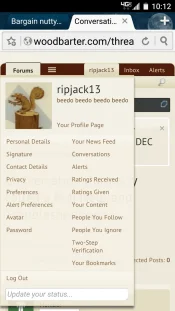
Click on alert preferences ...to bring you this page...
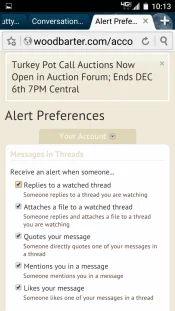
Then uncheck each box you do not want to be notified about. And then click save at the bottom...
Click on alert preferences ...to bring you this page...
Then uncheck each box you do not want to be notified about. And then click save at the bottom...
@Sidecar if you use the Unwatch Thread function Pyrite suggested then you won't even get the Alerts for that thread when you come to the forum. Same with Marc's method - that will stop your Alerts on ALL threads. To stop the email notifications only to your phone but keep the Alerts showing up when you log in (my preferred method too because I don't like all the emails but need the alerts) you need to use this method:
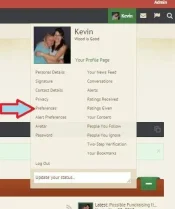
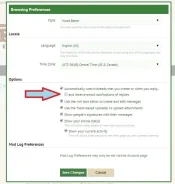
Ah...I forgot about that one...
Thank you Thank you Thank you ......your a gentlemen and a scholar !!!@Sidecar if you use the Unwatch Thread function Pyrite suggested then you won't even get the Alerts for that thread when you come to the forum. Same with Marc's method - that will stop your Alerts on ALL threads. To stop the email notifications only to your phone but keep the Alerts showing up when you log in (my preferred method too because I don't like all the emails but need the alerts) you need to use this method:
View attachment 92313
View attachment 92311

Is there a certain number of posts that are required before the "start conversation" button magically appears? Maybe I missed it...
5 posts and you should be good to go. Lemme know if it works.
Thank you kind sir...will keep ya posted
I don't get the "start a conversation note".
Click on the members name/avatar and a box pops up like this...I don't get the "start a conversation note".
