

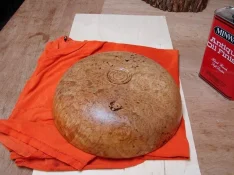
The first step in my process is to complete the piece and apply the finish and allow it to dry completely. In this case I was using Antique Oil and had put on 5 coats. The last coat had been applied just over 24 hours previous. We’ll get to why the finish must be applied and completely dry later.
[attachment=21238]
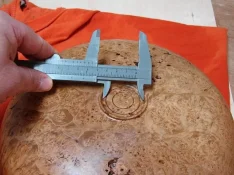
Next, I take careful measurements of the foot. Normally, I use a more accurate dial caliper but, it seems to have grown legs and walked off from my shop. In this case, I measured and recorded the inside diameter of the foot, and the diameters of the outer and inner rings. Now, to the computer we go.
[attachment=21239]
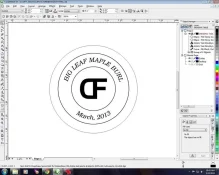
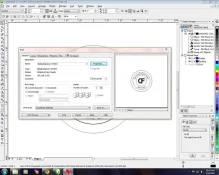
CorelDRAW is the graphic design software I use to produce the images that are “printed” by the engraver. In this instance, I am producing a template, drawn to the dimensions that I measured earlier. It will be cut out of a scrap piece of mat board. The outer circle will be a vector or “cut” line, the other circles, text & my brand/signature will be raster or “engrave” image. One could easily sign a piece of paper with a felt tip pen, scan and insert it where my brand is. So yes, I could use my actual signature if I chose to.
[attachment=21240]
[attachment=21241]
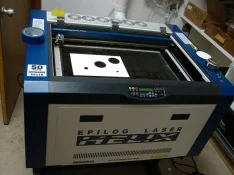
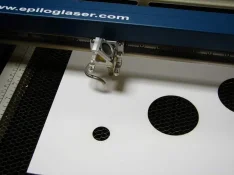
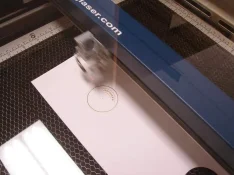
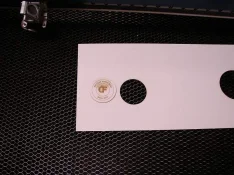
Here is the engraver. I've placed a piece of mat board on the honeycomb cutting tray. When cutting, the honeycomb causes the laser beam to scatter and lose power once it goes through the substrate, so there’s no “back splash” onto the material you are cutting. The red dot is just a laser pointer. It’s an alignment tool that shows exactly where the beam that will be doing all the work is going to hit. The engraver works off X – Y coordinates, just like the old style plotters did. The blue bar is the carriage that moves along the Y axis, and the head moves along the X. The template is now complete and I can tell the text will work nicely in the space allowed on the bowl foot. Notice the tiny black dot in the middle of the template. It is the most important part of the next step.
[attachment=21242]
[attachment=21243]
[attachment=21244]
[attachment=21245]
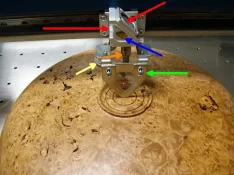
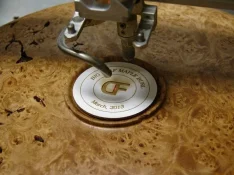
Now, I’ll tell you a little about how this thing works. In the picture with all the arrows, the red arrow that points to the right represents the laser beam itself. It, as well as the red laser are shot out of the gun (yeah, a real laser gun) that is mounted to the front of the carriage on the left side. The second red arrow is pointing to a mirror that is mounted on a precise 45^ angle to the two laser beams. It redirects the beams through a lens (blue arrow) that focuses the energy into an hourglass shape. At the very invert of the “hourglass” is where the laser energy is at its highest. The green arrow is pointing to the manual focus device. To make sure your piece is in focus, the tray is moved up or down via servo motors until the device touches. In this case it’s about 2” from the lens, which is the invert of the “hourglass”. The orange arrow is pointing to the auto focus pin. It’s used when the engraving position isn’t as critical. The yellow arrow is pointing to the forced air tube. I connect my compressor regulated at 30 psi to the engraver. The focused laser beam generates a tremendous amount of heat in nanoseconds and literally obliterates what it hits. Most of the time it’s no big deal but some of the things we engrave are highly combustible. The forced air actually blows the fire out before it becomes a problem. Think John Wayne as Red Adair in Hellfighters. All that’s left is to place the template on the foot, align the red dot laser with the black dot on the template, remove the template, and press the go button.
[attachment=21246]
[attachment=21247]
[attachment=21238]
Next, I take careful measurements of the foot. Normally, I use a more accurate dial caliper but, it seems to have grown legs and walked off from my shop. In this case, I measured and recorded the inside diameter of the foot, and the diameters of the outer and inner rings. Now, to the computer we go.
[attachment=21239]
CorelDRAW is the graphic design software I use to produce the images that are “printed” by the engraver. In this instance, I am producing a template, drawn to the dimensions that I measured earlier. It will be cut out of a scrap piece of mat board. The outer circle will be a vector or “cut” line, the other circles, text & my brand/signature will be raster or “engrave” image. One could easily sign a piece of paper with a felt tip pen, scan and insert it where my brand is. So yes, I could use my actual signature if I chose to.
[attachment=21240]
[attachment=21241]
Here is the engraver. I've placed a piece of mat board on the honeycomb cutting tray. When cutting, the honeycomb causes the laser beam to scatter and lose power once it goes through the substrate, so there’s no “back splash” onto the material you are cutting. The red dot is just a laser pointer. It’s an alignment tool that shows exactly where the beam that will be doing all the work is going to hit. The engraver works off X – Y coordinates, just like the old style plotters did. The blue bar is the carriage that moves along the Y axis, and the head moves along the X. The template is now complete and I can tell the text will work nicely in the space allowed on the bowl foot. Notice the tiny black dot in the middle of the template. It is the most important part of the next step.
[attachment=21242]
[attachment=21243]
[attachment=21244]
[attachment=21245]
Now, I’ll tell you a little about how this thing works. In the picture with all the arrows, the red arrow that points to the right represents the laser beam itself. It, as well as the red laser are shot out of the gun (yeah, a real laser gun) that is mounted to the front of the carriage on the left side. The second red arrow is pointing to a mirror that is mounted on a precise 45^ angle to the two laser beams. It redirects the beams through a lens (blue arrow) that focuses the energy into an hourglass shape. At the very invert of the “hourglass” is where the laser energy is at its highest. The green arrow is pointing to the manual focus device. To make sure your piece is in focus, the tray is moved up or down via servo motors until the device touches. In this case it’s about 2” from the lens, which is the invert of the “hourglass”. The orange arrow is pointing to the auto focus pin. It’s used when the engraving position isn’t as critical. The yellow arrow is pointing to the forced air tube. I connect my compressor regulated at 30 psi to the engraver. The focused laser beam generates a tremendous amount of heat in nanoseconds and literally obliterates what it hits. Most of the time it’s no big deal but some of the things we engrave are highly combustible. The forced air actually blows the fire out before it becomes a problem. Think John Wayne as Red Adair in Hellfighters. All that’s left is to place the template on the foot, align the red dot laser with the black dot on the template, remove the template, and press the go button.
[attachment=21246]
[attachment=21247]


