Ok, here are some pics showing how I do these. Everybody does these a little different, and I'll try to point that out as I talk about my process.
After turning and beading, the first thing is to establish a base line (radial line) to measure off of for the design. Many draw the radial line(s) using an index plate on the lathe. I've only done that once. The reason I don't draw radial lines on the lathe is two fold. First, I don't come up with a design and then turn a form to draw it on, rather I try to always have a couple of turned and beaded forms laying around so when I get an idea I can grab a form and start. Second, in Native American lore, odd numbers are more highly regarded. If I can, I typically use an odd number of elements in most designs. I know it is easy to make a index plate with odd numbers, just never bothered.
I typically just randomly draw a radial line and go from there. Relatively simple on a bowl or platter as a radial line is a strait line from the center to any point on the rim. I use a plastic ruler that has been cut in half lengthwise to lessen the impact of drawing a curved line on a bowl with compound curves (radial and tangential). On these hollow forms that's a little tougher as the tangential curve is much tighter and it's easier to get error. Starting with the current form, I did pop it back on the lathe to draw a single radial line. I'll probably do that in the future to simplify things.
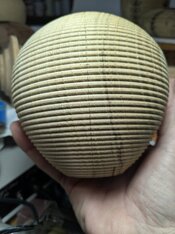
From there, I don't measure, rather I use a compass/divider with needle points to divide the circumference into the divisions I need. On these, I mark points at the top, middle and bottom, then connect them.
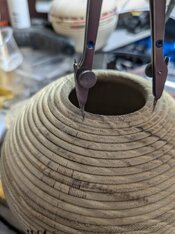
This is my favorite divider, a classic made in the US, Vemco.
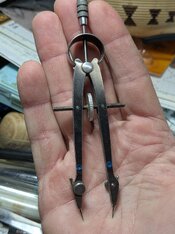
With the radial line, I use the divider to establish endpoints off the center. In the past, I would mark those lines with a pencil and the burn, but on some woods the pencil lines are hard to erase and remain visible.
It looks very awkward, but really isn't. I use the divider in my left hand and the burning tip in my right and it goes much more quickly than making pencil marks and coming back to burn. It's also more accurate due to the thick width of the pencil line.
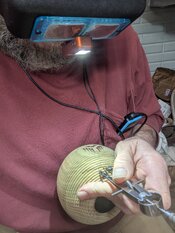
After outlining the area to be inked, I then go back and fill in the burn lines before coloring. Some people color before burning as they say the tip of the ink marker lasts longer. Maybe a little, but the fine tip on these markers doesn't last long either way. I also prefer the look of inking over the burn lines vs burning after inking.
For scale, this colored element is 1.25" wide by 1" high. The tips of the triangles are under 1/32".
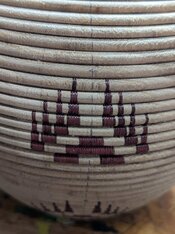
One interesting thing to note is how the design changes a little bit due to the diameter and curvature. The size of the various elements remains the same, but the angle/spacing of elements (particularly tall elements) get closer together as the diameter decreases.
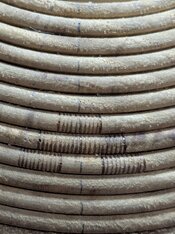
One other thing to keep in mind is the burn lines in the pic below are less than 1/32" apart. Somewhere between 1/36-1/38" apart. The below image approximates what I see with the magnifiers on. At times it looks very rough, but when you look at it at arms length you don't see all the tiny little "rough spots".
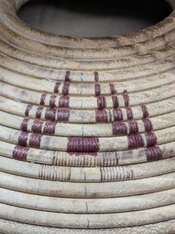
Here is where I'm at after tonight's session. Two of the five columns of red are done.
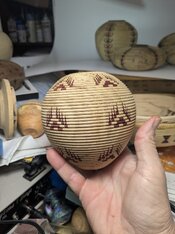
If anyone has any questions or comments, fire away. There are lots of little tips and tricks I can share if anyone wants to have a go trying this style of basket illusion.

the laser I got is a little thick, but can easily use one edge of the line for marking. It also has mag mounts and a tripod mount (1/4 20 threads). Should be easy to make an overhead mount so I can turn it on then hold the piece with one hand and draw with the other.


