
Computer Question

Kevin

Wood is good.
Founding Member
In Memoriam
Messages
30,914
Reaction score
37,294
Location
Texas
First name
Kevin
Does anyone know how to get rid of this incessant box that follows the cursor over every link? Sometimes it's huge depending on the inf it shows and it's almost always blocking out a bunch of stuff on pages where there's a lot of info close together. For some reason the cursor itself will not show so I made a red box and line where the cursor was when I took this screen shot. The box that I want to get rid of is pointed at by the blue arrow.

[attachment=10396]

No search I could think t make would bring up a article about it, they all want to show you how to remove the blinking cursor *from* a text box etc. I need to disable this feature in both Vista and Win7.
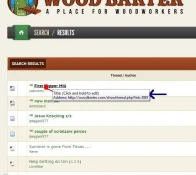
cursor box.webp
 
What browser are you using? I haven't had this happen to me.
 
i have had that happen once, assuming youre not in admin edit mode.
uninstall your browser ( like firefox ) and re-install.

if that doesnt work, update your mouse drivers, or also re-install.

if you have not reformatted your computer in a while and use it frequently, you will benefit from that as-well. normally once drivers and hardware start errors, or malfunctioning, its a sign to give her a new slate. take that chance to open her up and blow out all the dust and debris. even small layers of dust inside your case can cause electrostatic buildup, causing malfunctioning or potential damage to sensitive components. in all reality, you have a better chance of getting hit by lightning, but it also will keep the computer cooler.


** Also, Go To ( In Windows Vista Ultimate X32 or X64 ) Start, Control Panel, Mouse, And Then Pointers Tab. Make Sure You Have A Pointer Selected. If So, Go To Pointer Settings Tab, And Check To See If You Have " Hide Pointer While Typing " Checked. Un-Check IT And Restart The Computer. If You Do Not Have FireFox As Your Default Browser, I Recommend You Give It A Shot. Its Far Superior To Internet Explorer, And Much Safer. Id Check To See IF It Behaves The Same As Internet Explorer. If Not Than Its Internet Explorer. If It Does, Its Hardware.
 
  • Thread Starter Thread Starter
  • #4
I have this text box on both my laptop (Vista) in the shop, and also on the PC (Win7). I use Opera and FF on both computers simultaneously. I'm not sure I want to attempt some of the things you suggest i.e. reformatting the disk etc. I don't feel comfy with that.

As to your mouse settings suggestions I tried that right away. These computers are on a common wireless network, but I can't imagine that could have anything to do with it?

:dunno:
 
Kevin said:
I have this text box on both my laptop (Vista) in the shop, and also on the PC (Win7). I use Opera and FF on both computers simultaneously. I'm not sure I want to attempt some of the things you suggest i.e. reformatting the disk etc. I don't feel comfy with that.

As to your mouse settings suggestions I tried that right away. These computers are on a common wireless network, but I can't imagine that could have anything to do with it?

:dunno:

Try this, click tools at the top of the browser, select options, select content, open the advanced tab referring to java script, select/check the box to disable context.

If your box is checked, uncheck it and restart firefox and check again, you might have to check and uncheck.
 
  • Thread Starter Thread Starter
  • #6
I tried your idea in FF (twice to make sure) and performed the Opera equivalent and no joy. Don't fell bad, I have this question posted in a computer forum and it has everyone scratching their heads even the "experts".

I have a way of attracting odd problems.

:wacko3:
 
Kevin said:
I tried your idea in FF (twice to make sure) and performed the Opera equivalent and no joy. Don't fell bad, I have this question posted in a computer forum and it has everyone scratching their heads even the "experts".

I have a way of attracting odd problems.

:wacko3:

I think this is a MyBB issue, here is some data to consider. look at the bold and underlined text below.

Mouse over Thread Preview 1.1
Displays a part of the thread when you hover over that thread’s title.
Author: zaher1988
Submitted: 3rd May 2006
Goal:
Displays a part of the thread when you hover over that thread’s title.

Installation:

Upload motp.php to ./inc/plugins
Go to Admin CP > Board Settings > Plug-in Manager > Activate

Upgrading from 1.0
Just upload motp.php to ./inc/plugins. No need to deactivate first.

Description:
Upong activation forumdisplay_thread will be edited to allow the mouseover message availability.
Once you hover over the thread’s title, a part of the image will appear, however BBCODES will not be displayed.

The max number of characters to show in the preview box can be set from
Admin CP > Board Settings > Change > Mouse over thread preview


Features:

Shows the specific part as preview for the thread you hover.

Prompts the user to specify the number of characters to show in this preview.

Easy Activation / Deactivation.


What’s new?
Fixing several bugs

URLs in posts.

Single quotes in thread’s title.

replacing.

` in thread’s title.
 
Looks like a plug in in MyBB causes this, but we should see it as well.

More data to consider.

Mouse over Thread Preview 2.0
Displays a preview of a certain thread that you hover over its title.
Author: zaher1988
Submitted: 11th July 2006
Last Updated: 11th July 2006
Mouse over Thread Preview 2.0

Goal:
Displays a preview of a certain thread that you hover over its title.

Installation:
Upload motp.php to ./inc/plugins
Go to Admin CP > Board Settings > Plug-in Manager > Activate

Description:
The moment you hover over certain thread’s title a box will appear enabling you to see a part specified by the admin of that message, including images, BB Codes etc….

1zo7q6v.jpg


Setting up:
The max number of characters to display in the preview box and the max size of the title can be set from
Admin CP > Board Settings > Change > Mouse over thread preview

Features:

Preview the thread in a CSS box.
No broken images.
No broken BB codes.
Prompts the user to specify the number of characters to show in the preview message.
RTL – LTR auto detection to fix the alignment of the box.
Customizable box through theme manager.
Easy Activation / Deactivation.


What’s new?

Compiled with a CSS popup box instead of the old tool tip.
BB codes are parsed.
Full customizable box.
 
  • Thread Starter Thread Starter
  • #9
If it were a mybb issue I can't see how it would follow me on every computer, every browser, every website, every page of every website etc. . . . .

And your examples do not match the latest version of mybb - much has changed. Have you been involved in mybb somehow?

I do appreciate the help but I don't think it's anything to do with mybb.


.
 
Kevin said:
If it were a mybb issue I can't see how it would follow me on every computer, every browser, every website, every page of every website etc. . . . .

And your examples do not match the latest version of mybb - much has changed. Have you been involved in mybb somehow?

I do appreciate the help but I don't think it's anything to do with mybb.


.

ok, now we are getting data that can lead me to a solution. since the image was of the wood barter site, I only assumed it was a problem with this site, I did read you were having it on two computers and two operating systems, however I did not read it was a recurring issue on any website.

Yes I have had workings with MyBB, long time, it was one of my first website builds many days past, ok, years...lol

I am webmaster, master naturalist, master gardener and would someday want the moniker master woodworker...lol
I spent a number of years as a webmaster as a source of income and still build the occasional website.

I'll keep my brain entrained to this and see if I can come up with a solution.
 
  • Thread Starter Thread Starter
  • #11
We have some things in common; you're a Master Naturalist and I am a Naturally Masterless. :sarcastic:

The Master Naturalist is a good program I have always wanted to take it. My vinter friend at our local winery is one. My wife is a Master Gardener so that's covered.

Actually the only thing I am a "master" at is my Ph.D in B.S. Artistry.


:mocking:
 
Kevin said:
I have a way of attracting odd problems.

:wacko3:

That's why we're all here, right? First time I've been called 'odd' and 'problem' in the same sentence though.

:rotflmao3:
 
take a look at this info.

http://www.sevenforums.com/tutorials/11836-pop-up-descriptions-enable-disable.html
 
here is info for opera.

http://www.opera.com/support/kb/view/714/

I found this earlier but i did not have the exact line of code that was needed to disable this feature.


this is for firefox.
To turn off tooltips you can change a hidden preference.

Type about:config into the location bar and press enter
Accept the warning message that appears, you will be taken to a list of preferences
Locate the preference browser.chrome.toolbar_tips and double-click on it to change its value to false

copy and paste " about:config " into the address bar, no quotes, into the place that shows the website address, a new window will open, find the line of code "browser.chrome.toolbar_tips" and double click that line, it should change the value to false.
 
  • Thread Starter Thread Starter
  • #16
Tried it all. Nothing works. It's an enigma.
 
  • Thread Starter Thread Starter
  • #18
To show you the extent of my frustration, this is how big they can get. Again my screen capture will not show my cursor fro some reason, show I'm showing off my arts graphic skills with the red facsimile . . . .

[attachment=10510]

comprob.webp
 
I think your issue is the HTML Title attribute or href object. Do you have any html editing software such as Dreamweaver, or MS Publisher installed? Sometimes these editing applications will install their own tools which toggle these tooltips on and off.
 
Kevin said:
To show you the extent of my frustration, this is how big they can get. Again my screen capture will not show my cursor fro some reason, show I'm showing off my arts graphic skills with the red facsimile . . . .

I have sent both images with all your computer data to a class A super programmer and computer expert, if this guy can't tell me what it is, get out the gun.
 
Back
Top