

Some members have asked me why the signature links are not active. They are. If you look around you'll see some of the members that have coded their own signatures from their control panel. Here's how to do it:
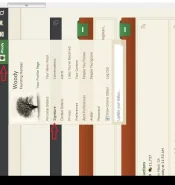
Click the tab with your name on it at the top right of the screen and you'll see this drop-down menu. Click the Signature link shown with the red arrow. . . . .
Once you do that you'll see a window with your present signature (or none at all). You want to use the brackets and coding exactly like I have below....
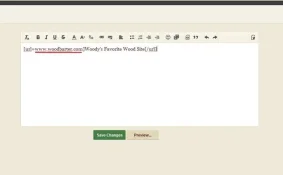
Just instead of using the www,woodbarter.com url like above, use your own. After you substitute your own url where the wood barter one is, you can put any name between the tags that want. So where mine says Woody's Favorite Wood Site, you could subsitute your own such as My Excellent Etsy Site or whatever. You can also highlight those words to use color and bold or italics etc. . . . .
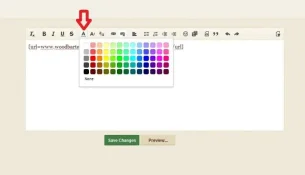
Once you highlight those words, you can use the color tool which is indicated by the red arrow below . . .
Once you're done it'll look like this.
And to see how Woody's signature looks click the link and scroll down to post #176.
Click the tab with your name on it at the top right of the screen and you'll see this drop-down menu. Click the Signature link shown with the red arrow. . . . .
Once you do that you'll see a window with your present signature (or none at all). You want to use the brackets and coding exactly like I have below....
Just instead of using the www,woodbarter.com url like above, use your own. After you substitute your own url where the wood barter one is, you can put any name between the tags that want. So where mine says Woody's Favorite Wood Site, you could subsitute your own such as My Excellent Etsy Site or whatever. You can also highlight those words to use color and bold or italics etc. . . . .
Once you highlight those words, you can use the color tool which is indicated by the red arrow below . . .
Once you're done it'll look like this.
And to see how Woody's signature looks click the link and scroll down to post #176.


