
• New Woodbarter Hats Are Available!!! Scroll down on the main page to the Member Activities & Site Support, Then click on Wood Barter SCHWAG and go to the topics on hats by Woodtickgreg to order your hat. There's only a limited quanity, so don't wait to get yours.

How To Embed A Video

Kevin

Wood is good.
Founding Member
In Memoriam
Messages
30,914
Reaction score
37,293
Location
Texas
First name
Kevin
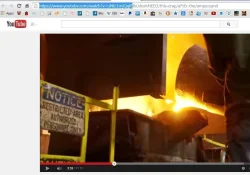
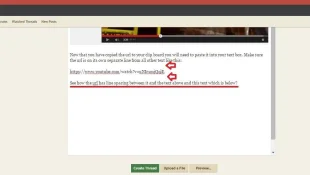
Embedding videos is very simple compared with the old software. This pictorial should explain it fairly quickly. Below you will see a string of code highlighted in the address bar. Everything to the left of the ampersand (the "&" character) is highlighted and copied to the clipboard (just depress your "Ctrl" key and while holding that down also then depress your "C" key). You DO NOT need anything to right of and including, the ampersand.
embed3.webp

embed4.webp

Once you have pasted the url into your text window and clicked Submit - your video automatically embeds. That's it. It really couldn't be simpler.
 
Last edited:
Thanks for posting this Kevin, up till now my attempts have been hit or miss.......
 
Edit:
The above works fine I am sure.
This is for the "keyboard shortcut challenged" such as myself. I just find mouse clicks easier than remembering when Ctrl C is copy and when Ctrl V is copy.


I am using Win 7 and IE 11.
In WB select the More Options from the "Post Reply, Upload a File, More Options" buttons.
Open a new tab in IE11 and go directly to youtube.
At youtube (and at your selection) right click the URL and you will get a dropdown, select copy.
Youtube Mamas.webp
In mine the URL turns blue.

Go back to the WB tab and select Media.
Media.webp

When you click Media you will get this popup.

Embed.webp
Right click in the "Enter media URL" and select Paste; then click Embed
Done. Add text above or below as you wish.
 
Last edited:
  • Thread Starter Thread Starter
  • #4
Nothing wrong with that Mike, it's just extra steps. Doing it as I described is simply a matter of pasting the code into the message - that's it. No need to look for the media box, then open, then paste, then submit - nothing to fuss with all that. Just one simple step after you copy the code in YT is all you need and that is Ctrl+V.
 
Yep! I posted this one 'cause you said I couldn't post any David Cassidy. Enjoy:sarcastic:
 
Back
Top