

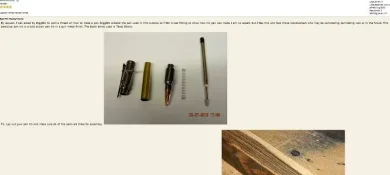
You can see how the images are jambed left and right against the screen in your post . .
[attachment=18117]
The reason is because the image codes which you did insert (good job) need to be on their own line, and not before or after a line of text as they are here . . .
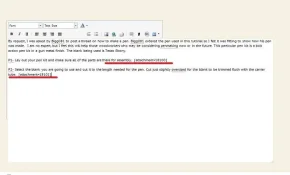
[attachment=18118]
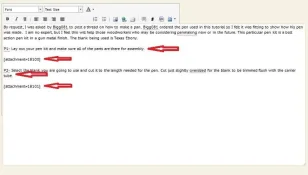
All you need to do is place your cursor before each attachment code and hit the enter tab twice. Once will work too, but I find it easier to view if there's a space between the text and the images so hitting Enter tab twice does that. I placed red arrows showing the sentence lines and image codes not on the same line anymore and you can see the spacing between the red arrows. When you do it, it looks like this . . .
[attachment=18119]
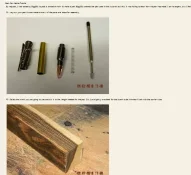
And once the spacing is between the attachment codes and the lines of text, it looks like this . . . .
[attachment=18120]
Much easier to view. I edited your first post but I'll let you do the others so you can get it down. Any questions please ask.
[attachment=18117]
The reason is because the image codes which you did insert (good job) need to be on their own line, and not before or after a line of text as they are here . . .
[attachment=18118]
All you need to do is place your cursor before each attachment code and hit the enter tab twice. Once will work too, but I find it easier to view if there's a space between the text and the images so hitting Enter tab twice does that. I placed red arrows showing the sentence lines and image codes not on the same line anymore and you can see the spacing between the red arrows. When you do it, it looks like this . . .
[attachment=18119]
And once the spacing is between the attachment codes and the lines of text, it looks like this . . . .
[attachment=18120]
Much easier to view. I edited your first post but I'll let you do the others so you can get it down. Any questions please ask.
